
Online notary
An online notary is a state-commissioned notary public who notarizes documents over a live video call instead of in person. You upload your document, verify your ID, sign on camera, and download the sealed PDF — usually in about ten minutes.
On Notaron: $25 per session, 24/7, no appointment and no account needed to start.

What is an online notary?

An online notary — also called a remote online notary, and the process remote online notarization (RON) — is a commissioned notary public who performs the whole notarization over a secure, two-way video connection. It is the same legal act you would get at a desk: the notary confirms who you are, watches you sign, and applies an official seal. What changes is the room. It is a video call, available at any hour, from wherever you are.
Three terms get used interchangeably. They are not the same thing:
- Online notary / remote online notarization (RON). You and the notary meet on live video, and the document is electronic. This is what almost everyone searching “online notary” means.
- Electronic notarization (e-notarization). Any notarization of an electronic document — including one where you sit in front of the notary in person and sign on a tablet. It is the broader category; RON is one kind of it.
- Remote ink-signed notarization (RIN). You and the notary are on video, but you sign paper in ink and mail it to them. A different procedure, permitted in fewer states, and slower because the originals have to travel.
One more that is not a notarization at all: an electronic signature on its own. An e-signature can make a contract binding, but nobody has verified your identity as a public official. If a document says it must be notarized, an e-signature does not satisfy that.
Is online notarization legal?
Yes. 42 states and the District of Columbia have laws in effect that authorize remote online notarization. A notarization performed under those laws is a full notarial act, with the same legal standing as one performed in person.
The detail most people miss: the notary’s state governs the act, not yours. What matters is that the notary is commissioned and authorized for RON in their state. So even if you live somewhere that has not authorized its own notaries to work online, you can generally use a notary commissioned in a state that has, and other states recognize the result.
Two honest caveats. A few states exclude specific document types from online notarization — depending on the state, wills, real estate closings or vehicle paperwork. And being valid is not the same as being accepted: a particular county recorder, court or bank can have its own rules about electronic documents. If your document is headed somewhere specific, ask the recipient before your session.
For the state-by-state detail — each state’s statute, its identity rules, and when we last checked it against the law itself — see our remote online notarization guide and state map.
How online notarization works, in five steps
The screens differ from platform to platform, but a compliant session runs in the same order everywhere, because the order is what state law requires.
Upload your document
Verify your identity
Meet the notary on video
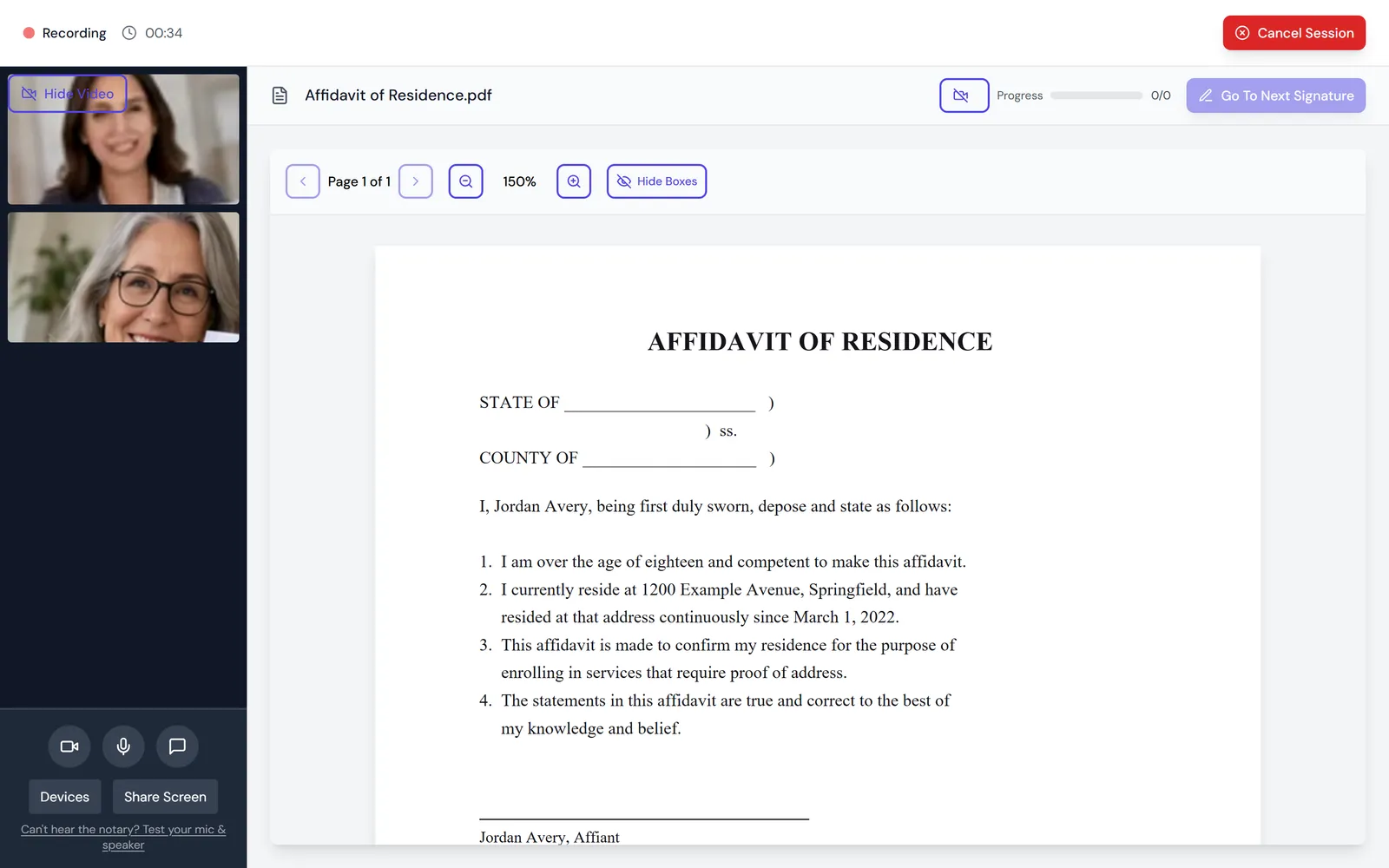
What you see in a Notaron session: the notary on live video, beside the document you will sign. The notary seals it
Download your document
A single-signer session usually takes about ten minutes from upload to download. You need your unsigned document, an unexpired government-issued photo ID, and a phone or computer with a camera and microphone.
Online notary vs. in-person vs. mobile notary
| Compared on | Online notary | In-person notary | Mobile notary |
|---|---|---|---|
| Where | Anywhere with a camera and internet | Their office, bank branch or shipping store | They travel to you |
| When | 24/7, no appointment | Business hours | By appointment |
| Identity check | ID authenticated by software, plus identity questions, plus the notary on camera | Notary looks at your ID | Notary looks at your ID |
| Record of the signing | Video recording, electronic journal, tamper-evident seal | Paper journal entry | Paper journal entry |
| Cost | From $25 per session | A per-signature fee capped by state law; often free at your own bank | The notary fee plus a travel fee |
| You leave with | A sealed PDF, the same session | Stamped paper, the same visit | Stamped paper, at the scheduled visit |
The honest version: if your bank notarizes for free and you are already going there during business hours, do that. An online notary is the better choice for most of the rest — the document that turns up at 9pm, the deadline tomorrow morning, the co-signer in another city, the day you cannot take time off to stand in a line.
What documents can be notarized online?
Most documents that need a notarized signature. These are the ones people bring most often; each links to a page on notarizing that document specifically:
- Power of attorney
- Affidavits and sworn statements
- Deeds and real estate documents
- Mortgage and closing documents
- Wills and self-proving affidavits
- Trust documents
- Child travel consent
- USPS Form 1583
- Documents for use abroad
- Prenuptial agreements
Your document does not need to be on a list. If it needs a notarized signature, upload it: the flow checks it before you pay and flags the documents that cannot be notarized online. The full list of documents by type covers the rest.
How much does an online notary cost?
$25
$5
$10
$15
Notaron starts at $25 per session. No subscription, no account needed to start, and nothing is charged until your session is complete.
For comparison: a bank notary is often free to account holders but means an in-person visit during business hours, and a mobile notary charges a travel fee on top of the notary fee. Many states also cap what a notary may charge per remote notarial act, separately from the platform’s charge for the technology and identity checks — when comparing services, check what the headline price includes. Every fee is on our pricing page, and the online notary cost comparison sets other services’ published prices side by side.
“Why not just…”
…use my bank? It’s free.
…email a signed PDF?
…trust it less because it’s online?
Frequently asked questions
Is a document notarized online legally valid?
Can I use an online notary if my state doesn't have a remote notarization law?
How much does an online notary cost?
What do I need for an online notarization?
Should I sign the document before the session?
What if my document needs witnesses?
How long does an online notarization take?
Ready when you are
A commissioned notary on secure video, 24/7 — $25 per session, about ten minutes, no account needed to start.